
Get the diagram you had in mind, faster
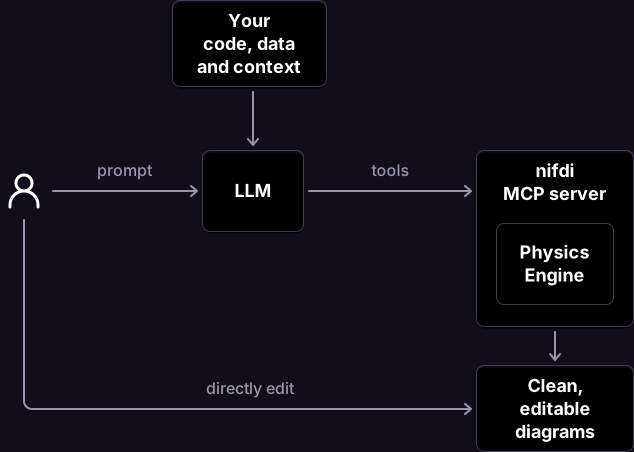
LLMs can generate images and diagrams, but the output is rarely exactly what you want. Often it feels easier to start again from scratch, than spend valuable time making clumsy adjustments via your agent.
With the nifdi MCP server, your agent gets the model it needs to do a better job.
Get you the diagram you want with less time, tokens and effort.
Structure and layout, sorted
The nifdi Physics Engine takes care of arrow routing, alignments and preventing overlaps, freeing the LLM from these responsibilities. Diagrams stay looking good, all the time.
Fully editable results
Use the Visual Editor to collaborate with your agent on the same diagram. Click, drag, type and format till you're happy, then ask the agent to pick up again where you left off.
Bulk changes made easy
Change multiple items in a diagram, or across multiple diagrams, without worrying about breaking layout or formatting.
Diagrams wherever you work
Check in nifdi's SVG-based files alongside your code, then use them directly in web pages, documentation and presentations.
Set up nifdi MCP
Local MCP server
FreeRun nifdi's MCP server on your own machine and edit diagrams stored right alongside your files.
Get the pluginCloud MCP server
Coming SoonConnect your agent to hosted nifdi diagrams for when you are working outside your codebase.
- 1Install the nifdi plugin.
- 2Open your project or codebase.
- 3Ask your agent to create or edit a diagram, and watch it happen in real time.