
nifdi AI
nifdi provides an MCP server for working with nifdi diagrams. This operates within your existing AI setup, so you can benefit from the existing access it has to all your code, data and other context.
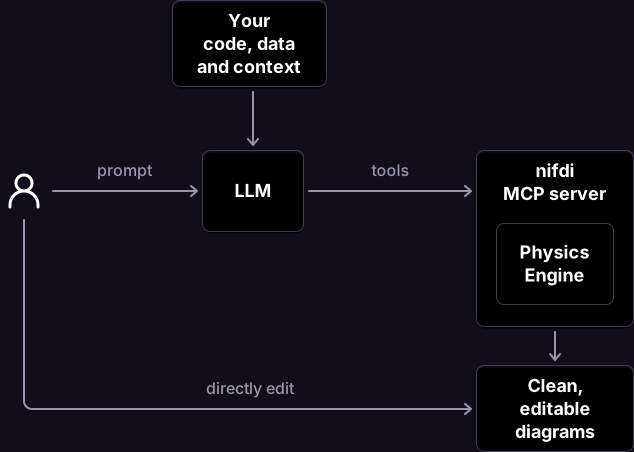
The core value of the MCP server comes from its Physics Engine. LLMs are not naturally good at keeping track of the complex geometric calculations needed to precisely maintain a diagram. Nifdi MCP relieves the LLM of this responsibility, freeing it to focus on its core capabilities.
Human-agent collaboration
Section titled “Human-agent collaboration”The best way to edit a diagram depends on the task. For broad-brush actions like creating a new diagram from scratch or making wholesale changes, a textual prompt works well. But when you want to make a small focused change like changing a specific word, visual editing is much faster.
Working with nifdi MCP supports both these ways of editing, and a typical workflow will be multi-step collaboration between human and machine. For example:
| Step | Mode | Action |
|---|---|---|
| 1 | Prompt | Ask for a new diagram. A diagam is generated and is 90% perfect |
| 2 | Visual Editor | Delete items that the LLM included but you didn’t want |
| 3 | Visual Editor | Adjust styling of one element |
| 4 | Prompt | Ask to apply styling change consistently across the whole diagram |
| 5 | Visual Editor | Drag to resize the diagram to be taller and narrower |
Your agent will be able to open the Visual Editor alongside your chat session. You will see the changes the agent is making in realtime, and you can intervene at any time to make your own changes.
Install the plugin
Section titled “Install the plugin”Most users should install the skills plugin. It bundles the MCP server together with guidance that teaches the agent how to build and review clearer diagrams.
If you client does not support plugins or Agent Skills, you can also directly install the MCP server .